
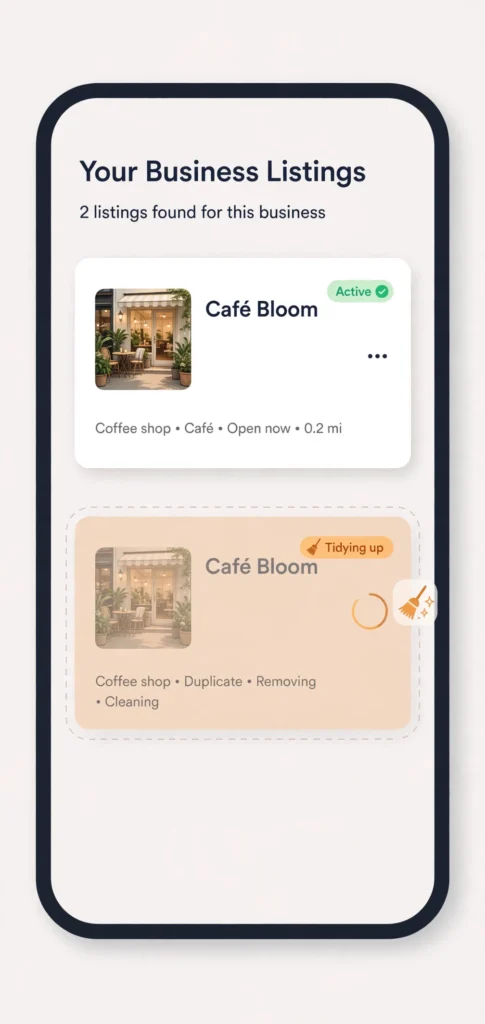
You search your business name and find it twice. Two listings, same name, slightly different addresses or phone numbers, reviews split between them. Or worse: customers keep calling an old number from a listing you forgot existed. That is a duplicate Google listing problem, and it quietly damages your ranking in a way that is easy to miss — because each listing on its own looks fine.
Duplicates usually appear innocently: a well-meaning employee created a second profile, an old address was never removed after a move, or a data aggregator generated a listing from an old directory entry. Whatever the cause, the fix is the same: find every version, choose one keeper, and deal with the rest properly.
The short answer
A duplicate Google listing splits your reviews, photos and ranking signals between two weaker profiles and confuses customers and Google alike. Find every version by searching your name, old name and old address; keep the verified listing with the most reviews and correct details; then remove, merge or report the rest, and recheck a week later.
Why duplicates hurt your ranking
A duplicate splits everything Google uses to judge you. Your reviews are divided between two profiles instead of building one strong total. Your photos, Q&A answers, and updates are scattered. Searchers who land on the weaker copy see fewer reviews and less information, and may choose a competitor instead. Google itself can get confused about which listing is the real one, and may show the wrong address, the wrong phone number, or neither listing with confidence.
There is also a trust cost. A customer who finds two versions of your business, with different hours or numbers, reasonably wonders which one is current — and may simply call the competitor whose details are unambiguous.
How to find every duplicate
Search your exact business name plus your town, and then your old business name if you ever changed it, and your old address if you ever moved. Check Maps as well as search, because a duplicate sometimes shows in one and not the other. Look for listings with your name but a different phone number, a misspelling, an old address, or a slightly different category. If you manage profiles for clients, running this search as part of a regular profile check routine catches duplicates early, before reviews pile up on the wrong copy.
Write down every listing you find: its name, address, phone number, and roughly how many reviews it has. Do not start deleting anything yet — deleting the wrong copy first can lose reviews that could have been kept.
Choose the keeper
The keeper is almost always the verified listing with the most reviews, the correct current address and phone number, and the most complete information. If one listing is verified and the other is not, the verified one is the keeper. If both are verified — which happens after a move or a rebrand — keep the one with the correct current details and the stronger review history, and plan to move or merge the rest.
If neither listing is verified, verify the correct one first, then deal with the other. Claiming and verifying the wrong copy by accident is a common way to make the problem worse.
The fix: remove, merge, or report
If you own and can manage the duplicate, use the options in your Business Profile dashboard to remove it. Google’s own guidance for duplicates is to remove the extra listing rather than leave it live. Do not just abandon it — an unmanaged duplicate keeps collecting wrong information and stray reviews.
If you cannot access the duplicate, use the “Suggest an edit” option on the listing in Maps or search, and mark it as a duplicate of your main listing, giving the correct listing’s details. Google reviews these suggestions, and a clear duplicate report with matching names and addresses is one of the more straightforward cases.
If the duplicate is for a business that has closed, moved, or changed name, make sure the keeper listing carries the current details, and report the old one as permanently closed or as a duplicate, as fits the facts. Never mark a genuine, still-trading competitor as closed — that is abuse of the reporting tool and can backfire.
After you remove or report a duplicate, recheck a week later. Duplicates sometimes reappear from old directory data, and a second check catches the ones that came back.
An illustrative example: the two-listing dentist
Here is a clearly illustrative example, not measured data, of how this plays out. A fictional dental practice in Glasgow — call it Northside Dental — had two listings after moving premises in 2023. The new listing had 41 reviews and the correct address; the old one had 18 reviews, the old address, and a phone number that now rang a different business. Patients kept turning up at the old address, and the practice’s reviews were split 41 and 18 instead of showing as 59 on one profile.
The practice chose the new listing as keeper, and first reported the old listing as a duplicate with the new listing’s details. When the old listing did not disappear after two weeks, the owner requested removal again with a note that the practice had moved. The old listing was removed in the third week.
After the cleanup: stop them coming back
Duplicates return when old data keeps circulating. Update your details on the main directories and your own website, so aggregators pick up the current address and phone number rather than the old ones. Keep one person responsible for the profile, and do not let well-meaning staff create new listings for promotions or new services — one business, one listing, with services listed inside it. A profile kept tidy with a steady monthly routine stays duplicate-free far more easily than one checked once a year. If you previously had a suspension or a visibility problem, recheck the reinstatement steps and the Maps visibility checks after the cleanup, because a duplicate removal sometimes surfaces a separate underlying issue.
A labelled note on country differences
Duplicate handling works the same in the UK, US, Canada, and Australia, because it runs through Google’s own listing system. The genuine difference is how often duplicates arise: businesses that have moved premises, changed trading names, or operated under a franchise name tend to collect more of them, and in the US, listings generated from large data aggregators are a common source. The fix — one keeper, remove or report the rest — does not change by country.

Questions owners ask next
Both listings are verified — which one do I keep?
Keep the one with the correct current details and the stronger review history, and plan to move or merge the rest into it. This happens most often after a move or a rebrand, where both copies look legitimate. If only one is verified, that verified listing is the keeper. If neither is verified, verify the correct one first — claiming and verifying the wrong copy by accident is a common way to make the problem worse.
Can I just delete the duplicate myself?
If you own and can manage it, yes — use the options in your Business Profile dashboard to remove it; Google’s own guidance for duplicates is to remove the extra listing rather than leave it live. If you cannot access it, use “Suggest an edit” on the listing in Maps or search and mark it as a duplicate of your main listing. What you must not do is simply abandon it: an unmanaged duplicate keeps collecting wrong information and stray reviews.
Will I lose the reviews sitting on the duplicate?
That risk is exactly why the order of operations matters. Write down every listing first — name, address, phone, review count — and choose the keeper before deleting anything, because deleting the wrong copy first can lose reviews that could have been kept. The keeper is normally the listing already holding most of your reviews, which is why review history is one of the deciding factors, not an afterthought.
The duplicate came back after I removed it — why?
Because duplicates are usually fed by old data still circulating. If directories and your own website still carry the old address or phone number, aggregators keep regenerating the old listing from it. Update your details on the main directories and your website, keep one person responsible for the profile, and do not let well-meaning staff create new listings for promotions or services — one business, one listing, with the services listed inside it. Recheck a week after every cleanup, then periodically.
What to do next
Search your business name, your old name, and your old address today, and write down every listing you find. Pick the keeper, then remove or report the rest one at a time, checking again a week later. If you do this cleanup for clients and want the duplicate search, the keeper decision, and the recheck kept in one organised routine, you can see the system I use on my Local Alchemist AI page. It needs your own hosting and your own API keys, and its AI output needs a human review before anything goes live — it organises the cleanup, it does not decide the keeper for you.
Disclosure: the page linked above contains an affiliate link. If you buy through it, I may earn a commission at no extra cost to you.